Mac Data Recovery:
the Chronodisk solution
We are recognised experts. Our engineers draw on more than 15 years of experience, proprietary tools and methods.



A computer fault, files deleted by mistake, corrupted files, accidentally lost images: you’re not sure how it happened, but you need to recover lost data from an Apple Mac. You’ve checked the hard drive’s contents, the file system, the trash, the memory card, the SD card, and your lost documents are nowhere to be found. It’s time to entrust your Apple MacBook, MacBook Pro, MacBook Air, iMac, Mac Pro, Mac mini… to Chronodisk, who will handle your Mac data recovery.
Storage types found on Mac
There are three types of storage found on Mac:
NAND flash memory soldered to the motherboard (since 2019)
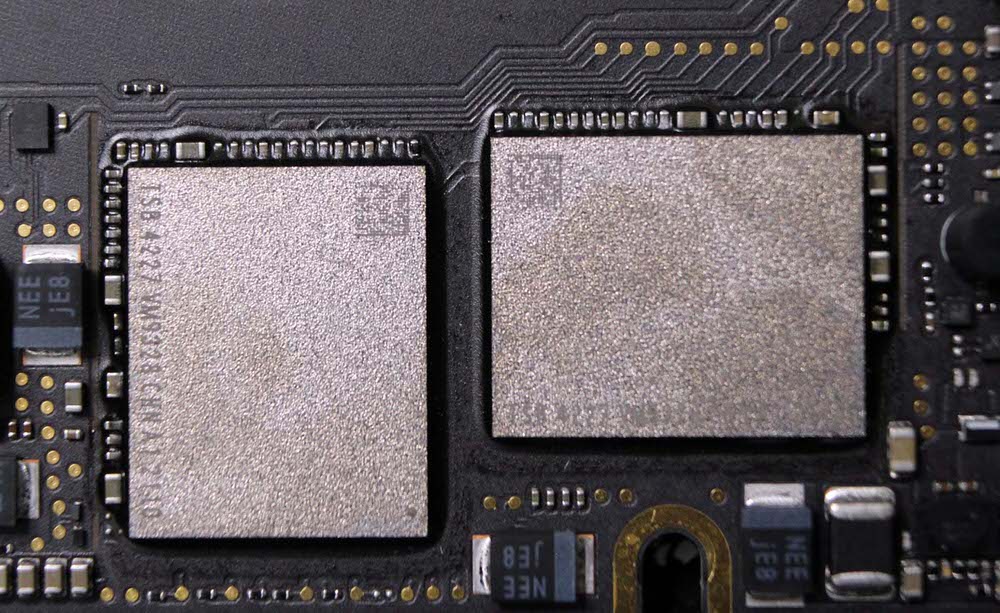
SSD drive (2013-2019)

Hard drive (before 2013)

Start a data recovery now
Request your free assessment and arrange a free collection of your media

What type of fault can affect a Mac?
A number of situations can lead to file recovery on a damaged storage device.
These are known as faults, which can be classified into two types: logical faults and electronic faults.
Logical faults
A logical fault is the least serious type of MacBook fault. The drive generally works normally, except that you can’t access your data. In this case, you’ll need to call on the services of a data recovery specialist.
All Apple devices run on file systems such as:
APFS, HFS, HFS Plus (HFS+), exFAT, FAT32
Logical faults are usually caused by:
- the presence of viruses in the software;
- excessive formatting;
- partitioning;
- accidental file deletion;
- and other causes.
Following a logical fault on your Mac, you may have files to recover, whether corrupted or deleted.
Electronic faults
In the case of an electronic fault, the drive is inert and is no longer detected by the MacBook’s operating system.
Electronic faults are usually caused by an abnormally high electrical voltage, the failure of an electronic component, or an external cause such as flooding or fire. MacBooks are not waterproof, and a spilled liquid is often the cause of the fault.
Whatever the nature of the fault, at Chronodisk we provide solutions tailored to recovering deleted or lost files on any type of storage media: computers, external hard drives, memory cards, USB keys, digital cameras, and more.
Data recovery: our 5-step process
Whether it’s recovering erased data, recovering deleted files or recovering a document, Chronodisk follows a five-step recovery process:
- Reception of your MacBook: acknowledgement of receipt.
- Diagnosis: we assess the damage and produce a diagnostic report to determine whether your data can be recovered, along with a list of recoverable data.
- Extraction and recovery of the data.
- Copying and backing up the data onto a new hard drive.
- Return of the drive.
Why entrust your data recovery to Chronodisk?
Mac products, and Mac data recovery in particular, are a Chronodisk speciality. There are many Apple product owners, yet Chronodisk is the only laboratory located in the heart of Paris. Every month, more than 20 Mac devices are entrusted to us, giving us unrivalled experience. What’s more, our experience in mobile phone recovery has given us the skills essential to working on Mac SSDs.
While software such as Disk Drill or Time Machine exists to recover data, it’s best to leave the recovery of your lost files to professionals. The free versions of this software aren’t always easy to use. We are recognised experts. Our technicians draw on more than 15 years of experience, proprietary tools and methods.

Start a data recovery now
Request your free assessment and arrange a free collection of your media
Expert insight: some technical challenges with Mac products
No technical documentation is provided by Apple:
For example, Apple does not release any motherboard diagrams. We have to produce our own documentation.
Spare parts unavailable:
we need to order a working motherboard to recover the components and transplant them onto the client’s board. These boards are very expensive.
Security:
The MacBook Pro and iMac Pro both include the Apple T2 chip, which controls the computer’s security: it’s specifically this chip that verifies the integrity of the software and hardware when the machine starts up. If the chip detects a problem, it may block the computer from starting up.
Source: https://www.macg.co/materiel/2018/10/la-puce-t2-bloque-toute-reparation-realisee-sans-laval-dapple-103818
High technology:
The level of technology is close to that of mobile phones.
List of Mac models with NAND soldered to the motherboard:
- A1181
- A1534
- A1932
- A1989
- A1990
- A2141
- A2159
- A2179
- A2251
- A2289
- A2237
- A2338
